Installation / Configuration
Installation and configuration guide for the LogiKal REST API V1
2 minute read
LogiKal REST API is a REST-like service. It can be used to handle projects and creating Model Based Elements (MBIOE = Model Based Input Of Elements).
The service is internally using the LogiKal C# API V3 .
The LogiKal REST API is currently a prototype. The prototype does not contain all functionalities yet.
The Logikal REST API V1 is supported since Logikal 12.0.
By utilizing the REST service you can enhance your application with the data and features of LogiKal. The service supports managing projects and positions, creating elevations through element pricelists, generating previews, thumbnails, reports and much more.
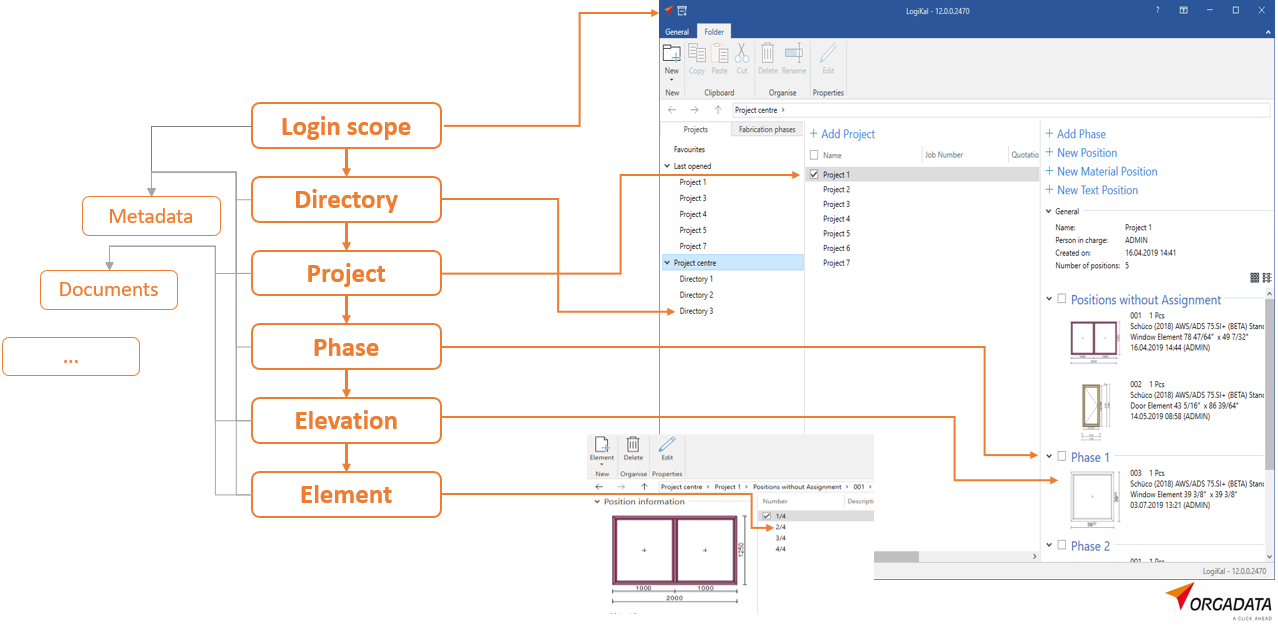
LogiKal bases its project management on the following hierarchy scheme. Elevations are children of phases, phases of projects, projects of directories and directories of the login scope.
The service is not a classical REST API as it balances the statelessness REST architecture with the stateful requirements of this API. Although all REST requests are converted into pure API calls, it is very helpful to think of the service as a remote control of LogiKal. For example, if you would like to create a new elevation, you would first have to select a project by making an appropriate request - just as you would have to click on a project in LogiKal. You could then and only then make the request to create the elevation. On a successful response, you could move your session to the elevation state and start the configurator. The service tracks your state and expects your API client to do the same. The possible session states are:
Each session state has its own supported requests. Refer to the swagger documentation for a list of all requests.
After a successful authorization a new session will be created in the default directory. In it you can for example make the request to list all projects. After you find your project of interest, you could make the request to select it and move therefore to the project state. You can only move up or down by one state at once. Switching states happens through selecting. So for example to move from the elevation state to the directory state, you’ll need to select the phase previously selected, then the previously selected project and then the directory.
Installation and configuration guide for the LogiKal REST API V1
Swagger documentation and Postman collections for the LogiKal REST API V1
Examples for the LogiKal REST API V1
How to report problems with the LogiKal REST API V1
Version history and deployment changelog for the LogiKal REST API V1
Frequently asked questions about the LogiKal REST API V1